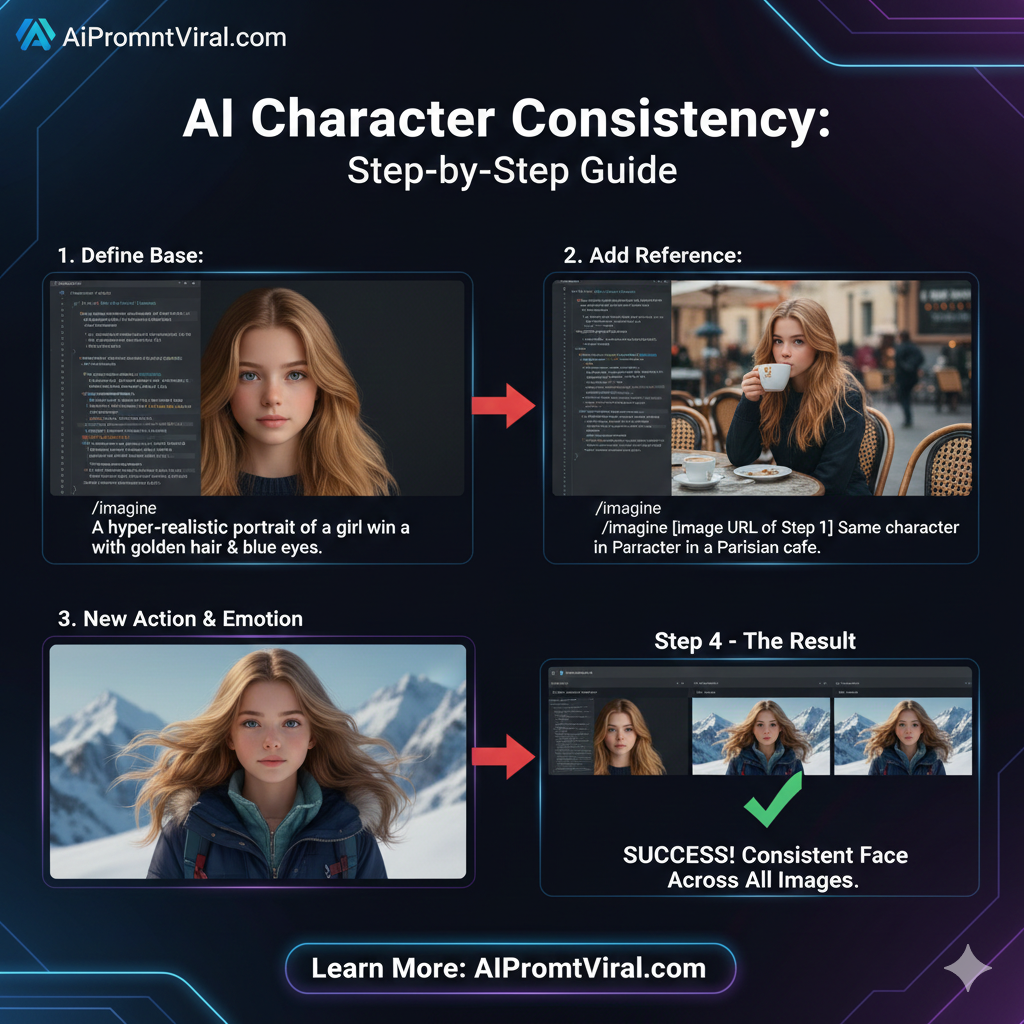
साधारण तौर पर जब हम AI से फोटो बनवाते हैं, तो हर बार चेहरा थोड़ा बदल जाता है। लेकिन यह आर्टिकल आपको वह तकनीक (Consistency) सिखाता है जिससे चेहरा वही रहेगा, बस कपड़े, जगह और भावनाएं (Emotions) बदलेंगी।
यहाँ इस आर्टिकल के मुख्य बिंदु (Main points) दिए गए हैं:
1. AI इन्फ्लुएंसर बनाना आसान (Character Consistency)
इसका सबसे बड़ा फायदा उन लोगों के लिए है जो Instagram या YouTube पर एक AI मॉडल का अकाउंट चलाना चाहते हैं। अगर चेहरा हर बार बदलेगा, तो लोग उसे ‘Fake’ मानेंगे। यह आर्टिकल उस चेहरे को Lock करना सिखाता है।
2. ‘Reference’ तकनीक का जादू
आर्टिकल यह बताता है कि कैसे एक Base Image (मुख्य फोटो) का लिंक इस्तेमाल करके आप AI को आदेश दे सकते हैं कि: “यही लड़की चाहिए, पर अब इसे लाल साड़ी पहना दो या इसे रोते हुए दिखाओ।”
3. प्रोफेशनल प्रॉम्पट्स की ताकत
इसमें दिए गए 10 प्रॉम्पट्स साधारण नहीं हैं। वे Technical हैं (जैसे 85mm lens, studio lighting, –cref)। इनका उपयोग करने से फोटो “AI जैसी” नहीं बल्कि बिल्कुल Real Photography जैसी लगती है
Place Your Ad on aipromptviral.com
Directly chat with us to book this space and grow your brand visibility.
 Chat on WhatsApp
क्या आप एक ही AI मॉडल को अलग-अलग सीन्स में दिखाना चाहते हैं लेकिन चेहरा बार-बार बदल जाता है? 2026 में, Character Reference (CREF) और ID-Linking की मदद से आप अपनी पसंद का चेहरा लॉक कर सकते हैं।
इस गाइड में, हम आपको 10 ऐसे प्रीमियम प्रॉम्पट्स देंगे जो आपके AI कैरेक्टर को हर फोटो में ‘एक जैसा’ (Consistent) रखेंगे।
The Secret Sauce: 2026 की नई तकनीक
अब सर्च इंजन और यूज़र्स “Consistent Storytelling” को पसंद करते हैं। इसके लिए हम Midjourney v7 के --cref पैरामीटर और Stable Diffusion के ‘IP-Adapter’ का उपयोग करते हैं।
Top 10 Advanced Prompts for Character Consistency
इन प्रॉम्पट्स का उपयोग करते समय, अपने पहले कैरेक्टर की इमेज का लिंक साथ में इस्तेमाल करें:
1. The Base Portrait (Identity Creation)
Prompt: A hyper-realistic portrait of a 25-year-old girl with freckles and emerald green eyes, wearing a simple gray hoodie. Sharp focus, studio lighting, neutral expression, high-detail skin texture, 8k resolution.
DIRECT SPONSORSHIPPlace Your Ad on aipromptviral.com
Directly chat with us to book this space and grow your brand visibility.
2. Same Character in New Outfit (Fashion Consistency)
Prompt: [Image URL] as a character reference, same girl with green eyes and freckles, now wearing a luxury red silk saree. Standing in a golden palace, cinematic lighting, sharp focus, consistent facial features.
3. Emotional Variation (The Crying Scene)
Prompt: [Image URL] as a character reference, close-up of the same girl, crying in the rain. Hyper-realistic tears, emotional lighting, wet hair, consistent facial structure, blue hour photography.
4. Action Shot (Running in Tokyo)
Prompt: [Image URL] as a character reference, the same girl running through a neon-lit Tokyo street. Motion blur, wind in hair, looking determined, sharp focus on the face, cyberpunk aesthetic.
5. Casual Lifestyle (Morning Coffee)
Prompt: [Image URL] as a character reference, the same girl sitting in a cozy sun-drenched cafe. Holding a steaming coffee cup, natural morning light, wearing a beige sweater, relaxed atmosphere.
6. High-End Professional (Corporate Look)
Prompt: [Image URL] as a character reference, the same girl in a sharp navy blue business suit. Professional headshot, office background, confident smile, soft rim lighting, 85mm lens.
DIRECT SPONSORSHIPPlace Your Ad on aipromptviral.com
Directly chat with us to book this space and grow your brand visibility.
7. Transformation: 3D Animation Style
Prompt: [Image URL] as a character reference, the same girl rendered as a 3D Pixar-style character. Soft round edges, vibrant colors, expressive eyes, consistent freckles, high-quality 3D render.
8. Environmental Change (The Winter Hike)
Prompt: [Image URL] as a character reference, the same girl hiking in a snowy mountain range. Wearing a heavy puffer jacket and wool cap, snowflakes on eyelashes, icy breath, realistic winter lighting.
9. Close-Up Macro (Extreme Detail)
Prompt: [Image URL] as a character reference, extreme close-up of the same girl’s eye and freckles. 100mm macro lens, realistic iris detail, soft lighting, focus on skin consistency.
10. The Identity Sheet (For Creators)
Prompt: Character sheet showing the same girl from front view, side profile, and back view. Consistent facial features, freckles, and emerald eyes across all angles, flat white background, studio lighting.
जब आप एक ही कैरेक्टर की कई इमेजेज जनरेट करते हैं, तो कभी-कभी AI चेहरा थोड़ा बदल देता है। इसे “Character Drift” कहते हैं। 2026 में गूगल पर लोग इस समस्या का समाधान बहुत सर्च कर रहे हैं।
Place Your Ad on aipromptviral.com
Directly chat with us to book this space and grow your brand visibility.
यहाँ AIPromptViral.com के लिए एक खास Troubleshooting Guide और 10 सीक्रेट फिक्सिंग प्रॉम्पट्स दिए गए हैं:
Troubleshooting Guide: AI चेहरा बदल जाए तो उसे ठीक करने के 5 तरीके
अगर आपका AI कैरेक्टर हर फोटो में अलग दिख रहा है, तो इन स्टेप्स को फॉलो करें:
1. Character Weight (–cw) का सही इस्तेमाल
Midjourney जैसे टूल्स में --cw (Character Weight) का इस्तेमाल करें।
- –cw 100: यह चेहरे, बालों और कपड़ों सबको कॉपी करता है।
- –cw 0: यह सिर्फ चेहरे को कॉपी करता है और आपको कपड़े बदलने की आजादी देता है। चेहरा फिक्स करने के लिए
--cw 100से शुरुआत करें।
2. ‘Strong’ के बजाय ‘Soft’ वैरिएशन लें
अगर चेहरा सही बना है पर बैकग्राउंड बदलना है, तो “Vary Region” या “Vary Subtle” का उपयोग करें। “Vary Strong” दबाने से AI चेहरे के फीचर्स बदल देता है।
3. ‘Unique Identifiers’ का प्रयोग करें
अपने कैरेक्टर को एक नाम या बहुत ही अनोखा फीचर दें। जैसे: “A girl with a small star-shaped mole under the left eye”। जब आप हर प्रॉम्प्ट में यह ‘Mole’ (तिल) लिखेंगे, तो AI चेहरे को फिक्स रखने की ज्यादा कोशिश करेगा।
Place Your Ad on aipromptviral.com
Directly chat with us to book this space and grow your brand visibility.
4. Face Swap टूल्स का बैकअप (InsightFace)
अगर प्रॉम्प्ट से बात नहीं बन रही, तो 2026 का सबसे लोकप्रिय तरीका है InsightFaceSwap डिस्कॉर्ड बॉट। अपनी बेस फोटो से चेहरा ‘Swap’ करके उसे 100% मैच करें।
5. Negative Prompts का सहारा लें
अगर चेहरा बार-बार बदल रहा है, तो Negative Prompt में लिखें: (deformed facial features, different face, change in eye color, altered chin shape).
10 Fixing & Refinement Prompts (चेहरा ठीक करने के लिए)
यहाँ 10 ऐसे ‘Modifier’ प्रॉम्पट्स हैं जिन्हें आप अपने मुख्य प्रॉम्प्ट के साथ जोड़कर चेहरे की स्थिरता (Consistency) बढ़ा सकते हैं:
- Face Lock Modifier: “…maintaining exact facial bone structure from reference image, no alterations.”
- Skin Detail Anchor: “…keeping the same freckle pattern and skin texture as seen in the original photo.”
- Feature Persistence: “…identical emerald green eye shape and eyebrow arch, preserving character identity.”
- Angle Correction: “…same character viewed from a 45-degree angle, preserving jawline consistency.”
- Expression Fix: “…same character smiling, but keeping the nose and eye shape unchanged from the base image.”
- Lighting Match: “…character rendered in sunset lighting while maintaining the original facial symmetry.”
- Hair Texture Guard: “…same hair volume and hairline as the reference image, no style change.”
- Age Consistency: “…ensuring the character consistently looks exactly 25 years old in every frame.”
- Anatomy Polish: “…correcting facial proportions to match the reference image exactly, high fidelity.”
- Identity Sync: “…syncing facial features with [Image URL] at 100% weight, zero drift.”
FAQ: यूज़र्स के सवाल
Q1. क्या मैं अपनी फोटो को AI कैरेक्टर बना सकता हूँ?
हाँ! अपनी फोटो अपलोड करें और उसे --cref (Character Reference) के तौर पर इस्तेमाल करें।
Place Your Ad on aipromptviral.com
Directly chat with us to book this space and grow your brand visibility.
Q2. चेहरा थोड़ा बदल जाए तो क्या करें?
प्रॉम्प्ट में “Consistent facial features” और अपनी पुरानी इमेज के मुख्य फीचर्स (जैसे: eyes color, freckles) को बार-बार लिखें।