📌 यह आर्टिकल किसलिए है? (Purpose of this Article)
अगर आप Instagram Reels या YouTube Shorts बनाते हैं, तो आप जानते होंगे कि एक Scroll-Stopping Thumbnail कितना ज़रूरी है। लेकिन समस्या यह है कि एडिटिंग में घंटों लग जाते हैं। इस आर्टिकल में हम आपको एक ऐसा “Magic Prompt” देंगे जो आपके असली चेहरे को बरकरार रखते हुए आपके पूरे थंबनेल को एक प्रोफेशनल स्टूडियो लुक दे देगा।
🔥 द मास्टर प्रॉम्प्ट (The Master Prompt)
नीचे दिए गए प्रॉम्प्ट को कॉपी करें और Google Gemini या किसी भी इमेज एडिटिंग एआई में पेस्ट करें। याद रहे, आपको अपनी फोटो अपलोड करनी होगी।
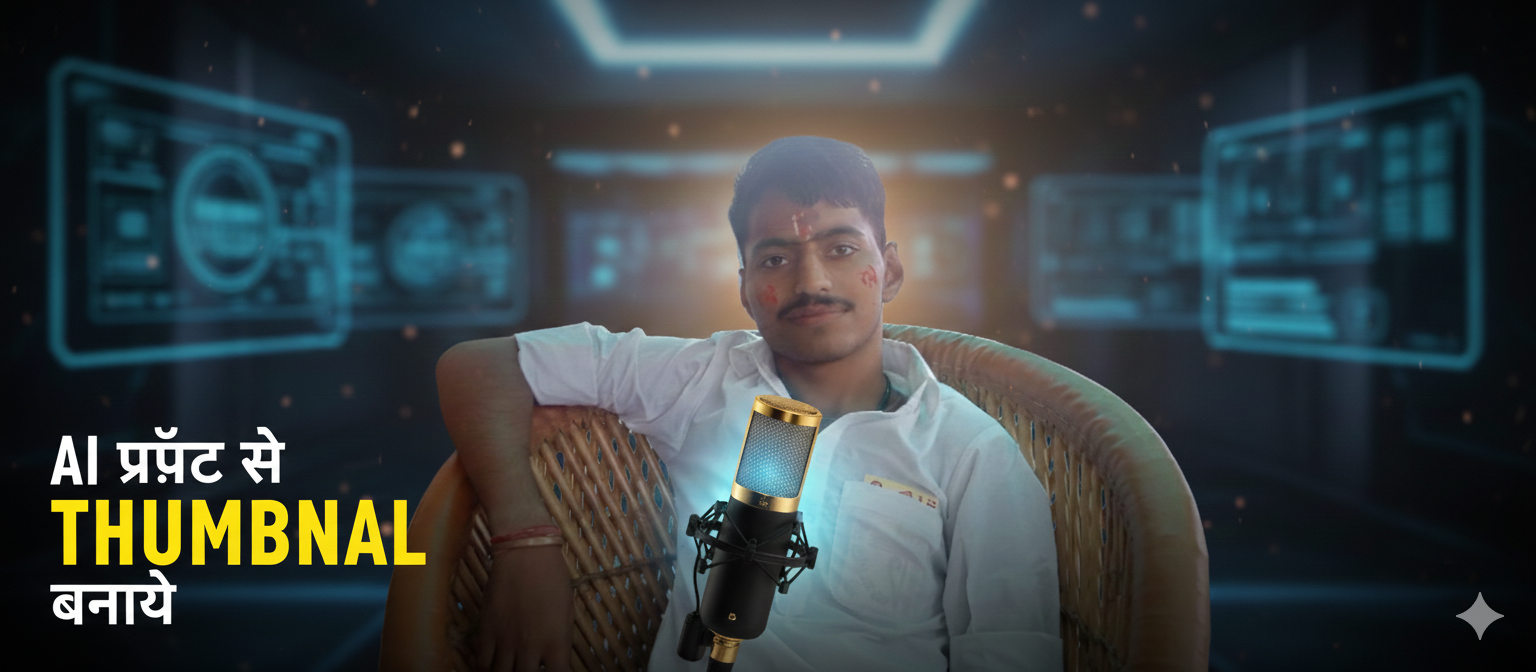
“Create a professional 9:16 reel thumbnail. Use my uploaded image.Crop the image till waist or mid chest only.Dont change my face, expression, jawline, eyes, or facial structure at all.Keep my face 100% natural and realistic.Remove the original background and replace it with a cinematic blurred professional background (depending on topic).Add soft light glow behind my head and slight vignette on edges.Based on my video title: “REPLACE THIS WITH YOUR TITLE”Automatically place a relevant object in my hand according to the topic.Example:If title is about iPhone, place an iPhone in my hand.If about microphone, place mic.Add bold clean thumbnail text (3–6 words maximum). Highlight the most important keyword in yellow. Keep the rest white. Make it clean, modern, professional, and scroll stopping. Do not clutter the design. Make object slightly glowing and foreground focused.“
💡 इस प्रॉम्प्ट का उपयोग करने के 10 तरीके (10 Example Prompts)
यहाँ आपके ब्लॉग के लिए 10 उदाहरण दिए गए हैं जिन्हें आपके रीडर्स सीधे इस्तेमाल कर सकते हैं:
| क्र.सं. | टॉपिक (Topic/Title) | हाथ में क्या आएगा? (Object in Hand) | हेडलाइन (Heading Highlight) |
| 1 | How to earn from Stock Market | 3D Glowing Profit Chart | Earn STOCKS Daily |
| 2 | Best iPhone 17 Features | iPhone 17 Pro Max | IPHONE 17 Review |
| 3 | Start your Podcast today | Professional Gold Mic | Start PODCAST Now |
| 4 | My Travel Vlog to Paris | Passport or Eiffel Tower Model | Paris TRAVEL Guide |
| 5 | AI Video Editing Tutorial | Floating Holographic Screen | AI VIDEO Secret |
| 6 | Healthy Fitness Routine | Dumbbell or Protein Shaker | Ultimate FITNESS Plan |
| 7 | Master the Photography | Professional DSLR Camera | CAMERA Masterclass |
| 8 | How to write Viral Script | Glowing Digital Pen | Write VIRAL Scripts |
| 9 | Best Gaming Setup 2026 | High-end RGB Controller | Best GAMING Setup |
| 10 | Make Professional Thumbnail | A Tablet with Design Tools | THUMBNAIL by AI |
🛠️ यह प्रॉम्प्ट काम कैसे करता है? (How it Works)
- Face Protection: यह एआई को निर्देश देता है कि आपके चेहरे के फीचर्स से छेड़छाड़ न करे।
- Contextual Background: आपके टॉपिक के हिसाब से बैकग्राउंड को ब्लर (Blur) और प्रोफेशनल बनाता है।
- Automatic Props: यह सबसे खास फीचर है—बिना फोटो खिंचवाए आपके हाथ में माइक या फोन पकड़ा देता है।
- Ready-to-Use Text: आपको अलग से फॉन्ट लगाने की ज़रूरत नहीं, एआई खुद लिखकर देता है।
Place Your Ad on aipromptviral.com
Directly chat with us to book this space and grow your brand visibility.
 Chat on WhatsApp