Leonardo AI गाइड 2026: फ्री में प्रोफेशनल एआई इमेजेस कैसे बनाएं?
क्या आप Midjourney के महंगे सब्सक्रिप्शन से थक गए हैं? 😫 तो आपके लिए खुशखबरी है! Leonardo AI आपको देता है वो सभी प्रीमियम फीचर्स जो एक प्रोफेशनल आर्टिस्ट को चाहिए, और वो भी हर दिन फ्री टोकन्स के साथ। चलिए जानते हैं इसका इस्तेमाल कैसे करें।
🌟 Leonardo AI ही क्यों चुनें? (The 2026 Edge)
Leonardo AI सिर्फ एक इमेज जनरेटर नहीं है, बल्कि एक पूरा डिजाइन स्टूडियो है। 2026 में इसके नए फीचर्स इसे सबसे अलग बनाते हैं:
- Daily Free Tokens: हर दिन 150 फ्री टोकन्स मिलते हैं।
- Canvas Editor: फोटो के बाहर की दुनिया को भी पेंट करें (Outpainting)।
- Real-time Generation: जैसे-जैसे आप टाइप करेंगे, इमेज बदलती जाएगी।
- Motion Tool: अपनी स्टेबुल फोटो को एक क्लिक में 3D वीडियो में बदलें।
🎨 टॉप 10+ Leonardo AI स्पेशल प्रॉम्प्ट्स (बस कॉपी करें!)
जैसा कि हमारा नियम है, यहाँ आपके लिए 10+ स्पेशल प्रॉम्प्ट्स हैं जो सिर्फ Leonardo के मॉडल्स पर बेस्ट काम करते हैं:
| No. | Art Style | AI Prompt (Copy Below) |
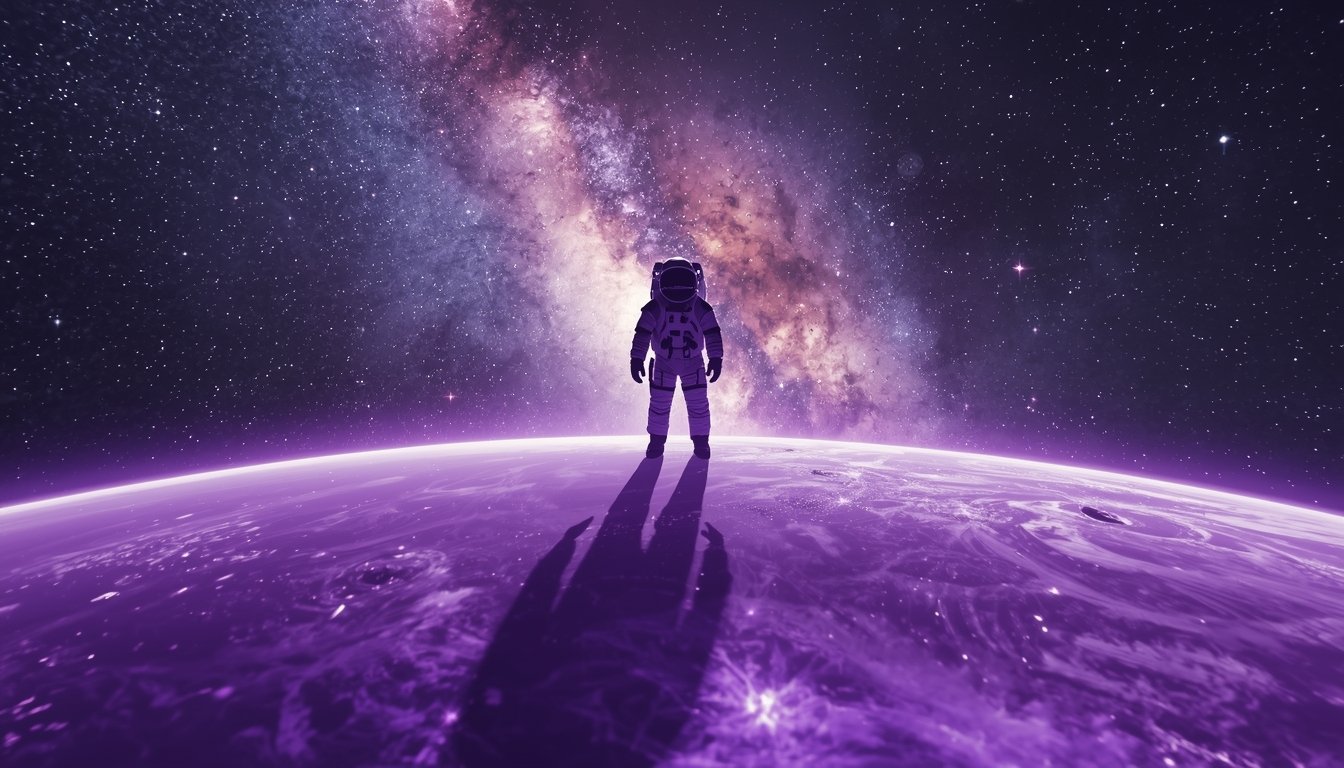
| 1 | Cinematic | A lonely astronaut standing on a purple glass planet, looking at a distant galaxy, hyper-realistic, 8k, cinematic lighting. |
| 2 | Cyberpunk | Cyberpunk city street in rain, neon signs in Hindi and English, futuristic cars flying, highly detailed, night shot. |
| 3 | Portrait | Close-up portrait of an Indian old man with deep wrinkles, eyes reflecting a village fire, photorealistic, national geographic style. |
| 4 | 3D Render | Cute 3D baby dragon sitting on a golden egg, vibrant scales, blurred forest background, Unreal Engine 5 render. |
| 5 | Interior Design | Luxury modern living room with a giant glass wall showing a waterfall, minimalist furniture, soft sunlight, 8k architecture. |
| 6 | Anime Art | Samurai girl standing under cherry blossom trees, katana glowing blue, studio ghibli style, vibrant colors. |
| 7 | Fantasy Art | A floating island with a crystal castle, waterfalls falling into the clouds, mystical birds flying, epic fantasy style. |
| 8 | Logo Design | Minimalist vector logo of a wolf, geometric shapes, blue and silver color palette, white background, high resolution. |
| 9 | Jewellery | Macro shot of a diamond necklace on a black silk cloth, dramatic spotlight, sparkling reflections, luxury product photography. |
| 10 | Food Art | Hyper-realistic splash of coffee with floating roasted beans and chocolate swirls, warm lighting, high-speed photography. |
| 11 | Watercolor | Dreamy watercolor painting of a peacock in a garden, soft pastels, artistic splashes, high-quality canvas texture. |
🛠️ यूजर के लिए गाइड: शुरुआत कैसे करें? (How to Start?)
- Leonardo.ai पर जाएं और अपना फ्री अकाउंट बनाएं।
- Image Generation टैब पर क्लिक करें।
- बायीं ओर से अपना पसंदीदा Model चुनें (जैसे- Leonardo XL या Vision XL)।
- aipromptviral.com से प्रॉम्प्ट कॉपी करके पेस्ट करें और ‘Generate’ दबाएं!
What to Avoid in Leonardo AI: Common Mistakes (लियोनार्डो एआई में इन गलतियों से बचें)
1. इग्नोर न करें ‘Negative Prompts’ (Don’t Ignore Negative Prompts)
सबसे बड़ी गलती जो नए यूजर करते हैं, वो है नेगेटिव प्रॉम्प्ट का इस्तेमाल न करना। अगर आप इसे खाली छोड़ते हैं, तो इमेज में एक्स्ट्रा उंगलियाँ या धुंधलापन आ सकता है।
Place Your Ad on aipromptviral.com
Directly chat with us to book this space and grow your brand visibility.
 Chat on WhatsApp
Avoid This: प्रॉम्प्ट बॉक्स को खाली छोड़ना। Do This: नेगेटिव बॉक्स में लिखें—
ugly, deformed hands, blurry, low quality, extra fingers, messy face, distorted anatomy.
2. गलत मॉडल का चुनाव (Choosing the Wrong Model)
Leonardo में हर काम के लिए अलग इंजन है। अगर आप ‘Anime’ मॉडल से ‘Realistic Portrait’ बनाने की कोशिश करेंगे, तो रिजल्ट खराब आएगा।
- Avoid:
Leonardo Vision XLको कार्टून के लिए इस्तेमाल करना। - Do: रियलिस्टिक फोटो के लिए
Leonardo Diffusion XLऔर एनीमे के लिएAnime Pastel Dreamsचुनें।
3. बहुत लंबे और उलझे हुए प्रॉम्प्ट (Over-complicating Prompts)
2026 के एआई मॉडल्स “Natural Language” को बेहतर समझते हैं। बहुत ज्यादा तकनीकी शब्द या कॉमा (,) का अति-प्रयोग एआई को कंफ्यूज कर देता है।
- Avoid:
A man, sitting, chair, blue shirt, red hat, sun, bright, 8k, photorealistic, hyper-detailed, unreal engine... - Do:
A man in a blue shirt and red hat sitting on a chair under bright sunlight, photorealistic 8k.
4. ‘Guidance Scale’ के साथ ज्यादा छेड़छाड़ (Messing with Guidance Scale)
अगर आप Guidance Scale को बहुत ज्यादा बढ़ा देते हैं (जैसे 15-20), तो इमेज बहुत ज्यादा “Saturated” और नकली दिखने लगती है।
- Avoid: स्केल को 12 से ऊपर ले जाना (जब तक बहुत जरूरी न हो)।
- Do: नेचुरल लुक के लिए इसे 7 से 9 के बीच रखें।
10+ वायरल टैग्स (Essential Tags)
- #LeonardoAI2026
- #FreeAIArt
- #MidjourneyAlternative
- #AIPromptViral
- #AIImageGeneration
- #DigitalArtTutorial
- #AIModelTraining
- #LeonardoAIPrompts
- #PhotoEditingAI
- #TechTrends2026
- #AIVideoGeneration